Connection guides
Basic instructions for using APRS Narva, Meshtastic MQTT and the APRS-IS server.
Meshtastic MQTT settings
In the Meshtastic app, open your device settings and enable MQTT. Then enter the local APRS Narva MQTT server parameters. The server address must include the port.
Basic parameters
- MQTT server:
aprsnarva.ee:1883 - MQTT topic:
msh/EU_868 - In Meshtastic, enter the port together with the server address. There is no separate port field.
- TLS/SSL:
disabled - JSON output:
enabled - Username and password: use only if they were issued by the network administrator.
Quick channel setup
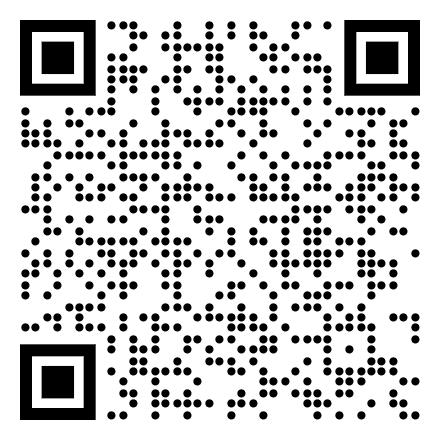
Scan the QR code in the Meshtastic app or open the link on a phone with the Meshtastic app installed.
What to enable in Meshtastic
- Enable the MQTT module.
- Enable JSON output. This is required for correct processing by the local map and server tools.
- Use MQTT topic
msh/EU_868. - Enable position reporting if you want your node to appear on the map.
- Make sure the node has GPS coordinates or a fixed position.
- Save the settings and restart the node, or wait for the next data transmission.
Connecting to the APRS server
For APRS clients and gateways, use the APRS Narva server connection below.
- Server:
aprsnarva.ee - Port:
14581 - Protocol: APRS-IS
- Use your amateur radio callsign as the login callsign.
- If your APRS client asks for a passcode, use the standard APRS-IS passcode generated for your callsign.
How to check
- Open the Mesh map and check if your Meshtastic node appears.
- Open the APRS map and check APRS stations or objects.
- If a node or station does not appear immediately, wait a few minutes.
- Check that the device has internet access through a phone, Wi-Fi or another gateway.
- Check the server address and port.
APRS map
The APRS map shows amateur radio stations, objects and tracking in Narva and Ida-Virumaa.
Open APRS mapMeshtastic map
The Mesh map shows Meshtastic nodes connected through the local MQTT server.
Open Mesh mapImportant
APRS Narva is a local amateur radio and crisis radio communication project. Settings may change as the system develops.
Contacts
Narva Raadioklubi
Callsign: ES4N
Crisis radio communication project in Ida-Virumaa.